A cart-recovery coupon can leave a shopper paying more if the discount removes free shipping. Test the same cart and delivery address with and without the coupon, then compare the final payable totals—not just the discount line.
Do not assume your WooCommerce store evaluates its free-shipping threshold before or after discounts. Establish what your actual configuration does, including shipping extensions or custom rules, before promising a saving.
See how a discount can increase the total
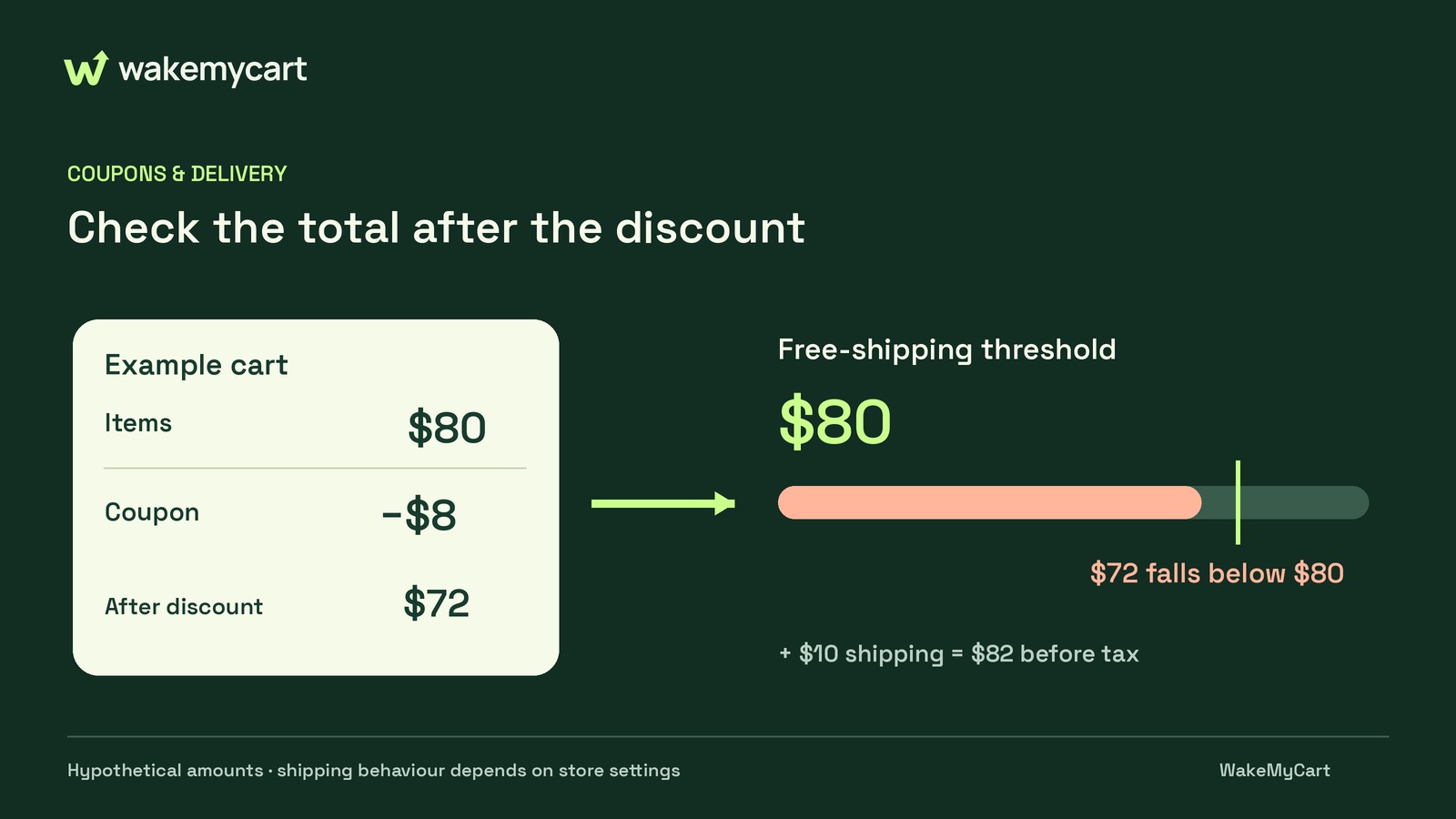
Consider a hypothetical store with an $80 free-shipping minimum evaluated after discounts. Assume all products qualify, standard shipping costs $10 below the minimum, and there are no other fees or discounts. Tax is omitted only to illustrate the interaction.
- Without the coupon: $80 in products and $0 shipping produce an $80 total before tax.
- With an $8 coupon: Discounted products cost $72. That falls below the assumed minimum, so adding $10 shipping produces an $82 total before tax.
The shopper receives an $8 product discount but pays $2 more before tax.
This is not an assumed WooCommerce default or a real-store result. Your configuration may preserve free shipping. Actual tests must use the final payable total, including applicable taxes and fees.
Prepare an isolated test
Safety prerequisites
Use a test copy with representative pricing, coupon, shipping and tax settings. Disable customer-facing email and scheduled reminders on that copy before creating test carts, and use contact details you control.
Compare checkout totals before submitting an order. Do not initiate real payments for this exercise.
Configuration facts to establish
Identify the free-shipping minimum, which items and amounts count toward it, whether discounts affect qualifying spend, and how tax enters that calculation. Record the covered destinations and shipping services.
Inspect the intended coupon’s value, restrictions and interaction with other discounts. Resolve unclear rules through the actual settings, relevant documentation or whoever maintains checkout—not an assumed default.
Write down the exact offer message, including its advertised saving and exclusions. The checkout result must support that promise.
Create a before-and-after record
Copy these labels into a test document or spreadsheet, using one record per cart-and-destination case. Use controlled test addresses rather than customer details.
- Case and configuration: Test date, settings reference, coupon, products and quantities, destination reference, currency, guest or logged-in checkout, existing discounts and threshold rules.
- Without coupon: Product subtotal and whether it includes tax; total discounts; available shipping methods; selected method and charge; taxes; fees; final payable total.
- With coupon: The same fields after applying the intended coupon and allowing checkout to recalculate.
- Total change: With-coupon final total minus without-coupon final total. A positive change means the shopper pays more; a negative change means a saving; zero means no change.
- Shipping change: Any change in availability, selection or charge—or explicitly note no change.
- Evidence: References to paired checkout screenshots and the relevant settings record.
- Decision and reason: Retain or withhold the current offer, the tested scope, the reason and any revision planned.
Keep tax-inclusive and tax-exclusive figures clearly labelled. Copy the final payable total directly from checkout; do not reconstruct it by subtracting discounts that may already be reflected in displayed amounts.
This record documents your manual comparison. It is not an automated compatibility check.
Run the boundary cases in a fixed order
Choose the cases
Build baseline carts just below, at and just above the threshold, using the amounts your store counts toward free shipping. Include a close-above cart that the discount could push below the minimum if discounts count, plus a cart farther above it.
If ordinary product prices cannot produce an exact boundary cart, record the nearest attainable values and the coverage gap. Repeat the cases for the destinations and shipping-relevant product combinations the offer is intended to cover.
Run each pair
Keep products, quantities, address, currency, guest or logged-in status and other inputs unchanged between the two versions.
If the reminder uses a special return path or applies a coupon automatically, repeat the comparison through that path in the isolated test environment. Manual coupon entry alone does not verify that journey.
Investigate exceptions before approval
If the coupon is rejected, record the checkout message. Do not count that case as a successful saving.
Pause approval if a shipping service disappears or the selection changes unexpectedly. Record what happened rather than silently choosing a cheaper alternative. An acceptable alternative service can be tested as a separate case.
If removing the coupon does not restore the baseline, treat the pair as unreliable. Investigate the changed state before repeating it.
Retain, revise or withhold the offer
Separate the immediate sending decision from possible repairs.
Retain the current offer only when the final payable total falls, the reduction supports the message’s claim, and eligibility can be restricted to the verified scope. Do not extend the conclusion to untested carts, destinations or configurations.
Withhold the current offer if the total stays the same or rises, the message overstates the saving, the outcome is unexplained, or eligibility cannot be reliably enforced. A note in a spreadsheet does not control who receives or can use a coupon.
Revise, then retest if a different coupon, narrower eligibility, clearer wording or changed shipping treatment could resolve the problem. Use only controls your store can actually enforce. Clearer wording alone cannot make a higher checkout total cheaper. The revised offer needs a new comparison before approval.
A lower customer total is not proof of profitability. Review product costs, fulfilment, shipping subsidies, payment fees and other relevant costs separately. A successful price test also does not replace reminder permission, purchase checks or unsubscribe controls.
Repeat affected tests when coupon, pricing, shipping or tax settings change. Start with one cart near the threshold and one eligible destination: capture both final totals and explain every difference before expanding coverage or sending the offer.